

Data loss used to be about hardware failure or a spilled cup of coffee. Today, the threat is much more aggressive. Ransomware is designed to find your backups and delete them before encrypting your main files. If your backup strategy is still based on 10-year-old logic, you are at risk.
The old 3-2-1 rule was a great start for a long time. It told you to keep three copies of your data on two different media types with one copy off-site. But in 2026, hackers know how to bypass that. This is why we have moved to the 3-2-1-1-0 backup rule. This strategy closes the gaps that modern cybercriminals exploit
What is the 3-2-1-1-0 Rule
This rule is a comprehensive framework for data resilience. It ensures that no matter what happens: be it a fire, a server crash, or a sophisticated state-sponsored hack: you can get your business back online quickly
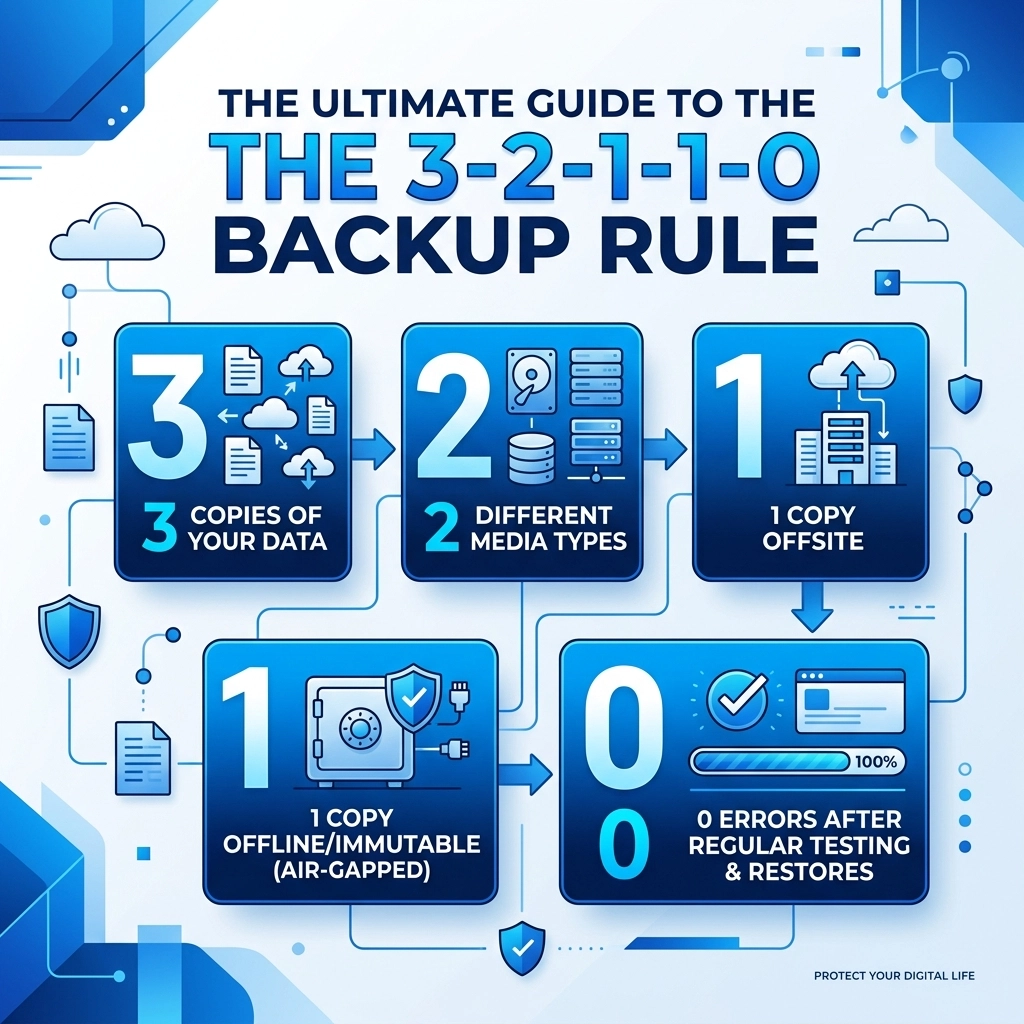
The numbers stand for:
- 3 copies of your data
- 2 different media types
- 1 off-site copy
- 1 offline or immutable copy
- 0 errors after backup verification

Why 3 Copies of Data
Having just one backup is not enough. If your primary data fails and your only backup happens to be corrupted, you have nothing. Keeping three copies includes your original production data and two separate backups. This creates a safety net. If one backup fails during the restoration process, you still have a third option to fall back on
We suggest using automated software to handle these copies so you do not have to remember to do it manually. Manual backups are the first thing to fail when a business gets busy. You can learn more about how we structure these systems at WorldWise Computer Support
2 Different Storage Media Types
Storing all your backups on the same type of device is a mistake. If you use two identical external hard drives from the same manufacturing batch, they might fail at the exact same time due to a common hardware flaw.
Mixing media types spreads your risk. We recommend a combination of:
- Internal server disks for speed
- Network Attached Storage (NAS) for local redundancy
- Cloud storage for geographic separation
- LTO Tape for long-term "cold" storage
By using different technologies, you ensure that a single software bug or hardware vulnerability cannot wipe out your entire data history
1 Copy Off-site
If your office suffers a physical disaster like a fire or a pipe burst, any backup sitting on a shelf in that same building is gone. You must have one copy located in a completely different physical location.
Cloud storage is the most common way to achieve this today. However, simply "being in the cloud" isn't enough. You need to ensure that the data is stored in a data center that is far enough away to not be affected by the same regional power grid failure or natural disaster. This is a core part of a solid Business Strategy for any digital-first company
1 Copy Offline or Immutable
This is the most important update to the backup rule. Modern ransomware actively hunts for backup files. If your backup drive is "mapped" as a letter on your computer (like the Z: drive), the ransomware will encrypt it just as easily as your desktop files
Offline Backups
An offline backup is physically disconnected from the network. This is often called an "air-gap." If a hacker can't reach the drive through a wire or Wi-Fi, they can't delete it. Tape backups or removable hard drives that are unplugged after the backup finishes are classic examples of air-gapping
Immutable Backups
Immutability is a digital lock. When data is written to an immutable storage bucket, it cannot be changed, deleted, or overwritten for a set period: even by someone with administrative passwords. If a hacker gets into your system and tries to delete your backups to force you to pay a ransom, the storage provider will simply block the command. This is your ultimate insurance policy against extortion

0 Errors through Verification
A backup you haven't tested is just a dream. Most businesses realize their backups are failing only when they actually need them. The "0" in the rule stands for zero errors during recovery testing
At WorldWise, we emphasize that "backup" is a verb, not just a noun. You must verify that the data is being backed up correctly every single day. This involves:
- Daily Monitoring: Checking logs for any skipped files or failed syncs
- Automated Testing: Using software that automatically spins up a virtual version of your backup to see if it actually boots
- Regular Restore Drills: Once a quarter, you should try to recover a specific folder or database to see how long it takes and if the data is intact
If you want to see how we help businesses stay on top of this, check out our Support Services
Implementing the Rule without the Headache
It sounds like a lot of work because it is. Managing five different stages of data protection takes time and technical knowledge. Many small business owners try to do this themselves and end up with a "1-1-0" strategy that leaves them wide open to attack
We recommend a managed approach where the technology handles the heavy lifting. Your focus should be on running your business, not checking backup logs at 6 am every morning
Step 1: Audit Your Current Setup
Look at where your data lives right now. Is it all on one server? Is it just in "the cloud" with no local copy? Identifying the gaps is the first step toward security
Step 2: Set Up Local Redundancy
Get a secondary storage device in your office. This allows for fast recovery if you just need to get one file back that someone accidentally deleted
Step 3: Connect to Immutable Cloud Storage
Find a provider that offers S3 Object Lock or a similar immutability feature. This protects you from the "total wipeout" scenario that keeps IT managers awake at night
Step 4: Schedule the Tests
Don't wait for a crisis to find out your internet is too slow to download a 5TB backup. Test the download speeds and the file integrity now

The Cost of Doing Nothing
The cost of implementing a 3-2-1-1-0 strategy is a fraction of the cost of a single ransomware payment. Beyond the money, there is the reputation damage. If your customers find out you lost their data because you didn't have a modern backup plan, they will go to a competitor who does
In 2026, data resilience is a competitive advantage. It shows your clients that you are professional, prepared, and reliable. Whether you are building a new site with Web Design or running a massive Marketing Campaign, your data is your most valuable asset. Protect it like it
Get Started Today
You don't have to fix everything this afternoon. Start by adding one more copy of your data or by turning on immutability in your cloud settings. Small steps lead to a much safer business environment
If you are not sure where to start or if your current IT setup is actually following these rules, we can help. We specialize in making sure your digital infrastructure is robust enough to handle the modern threat landscape. Visit our Contact Page to start a conversation about securing your data
Protecting your business isn't about luck. It's about having a system that works even when everything else goes wrong. The 3-2-1-1-0 rule is that system