
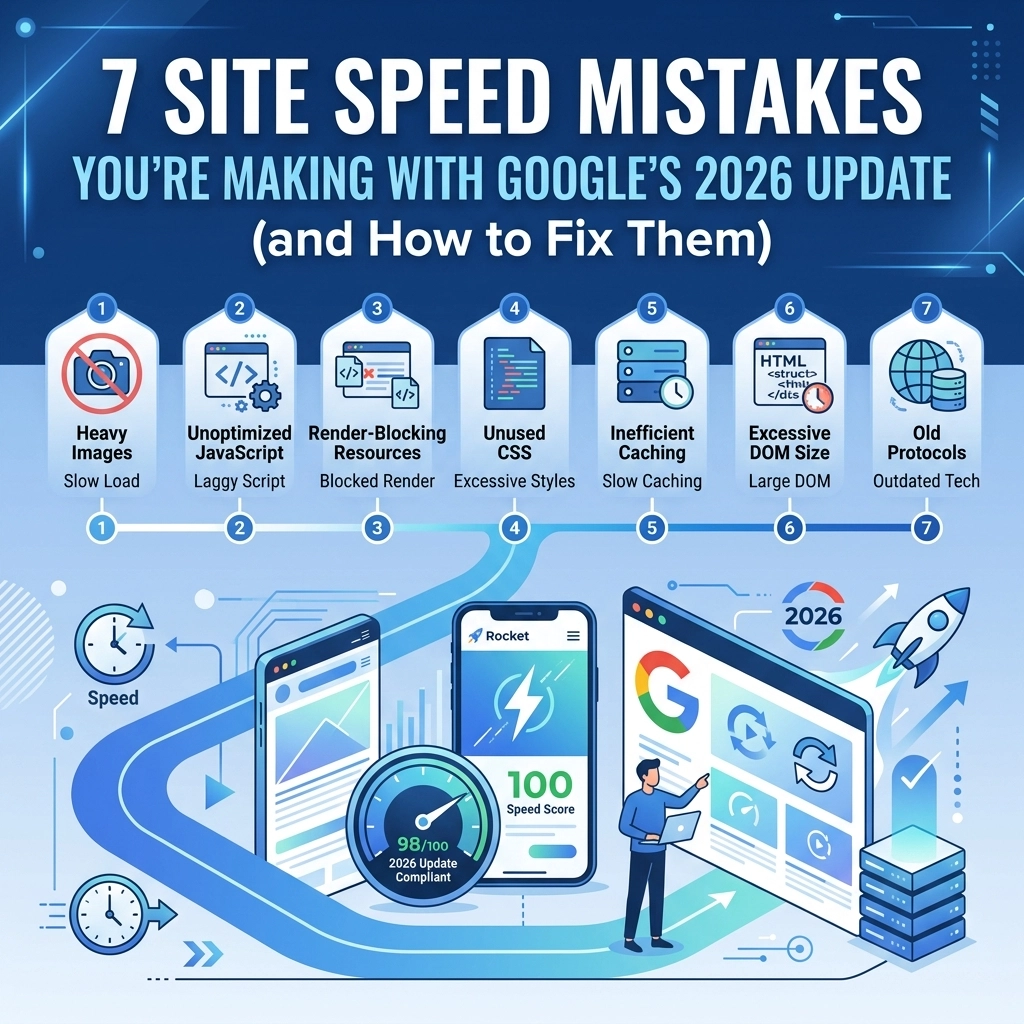

Google released a major core update in March 2026 that changed the way search rankings work. This update put a massive emphasis on user experience and technical performance. If your website traffic dropped suddenly this year, your site speed is likely the reason. Google now uses stricter metrics to judge how fast your pages load and how quickly they respond to user input.
Speed is no longer just a "nice to have" feature. It is a core requirement for staying visible in search results. Data shows that 53% of mobile users leave a site if it takes more than 3 seconds to load. In 2026, Google’s threshold for a "good" experience is even tighter. If you want to keep your rankings and your customers, you need to fix these seven common mistakes immediately.
1. Using Outdated Image Formats
Many business owners still upload large JPEG or PNG files to their websites. These formats are heavy and slow down your page. In 2026, Google expects you to use modern formats that provide better compression without losing quality.
The Mistake Uploading high-resolution photos directly from a camera or stock site without resizing them. This creates massive file sizes that mobile browsers struggle to download quickly.
The Fix Convert all your images to WebP or AVIF formats. These files are significantly smaller than traditional JPEGs. You should also implement responsive images. This means your website will serve a smaller version of an image to a phone user and a larger version to a desktop user. We suggest using a tool to automate this process across your entire library. At WorldWise, our web design services include automated image optimization to ensure every page loads instantly.

2. Ignoring Interaction to Next Paint (INP)
Google officially replaced First Input Delay with Interaction to Next Paint (INP) as a core metric. This measures how quickly your site responds when a user clicks a button or interacts with a menu. If your site feels "laggy" or "sticky," your INP score will be poor.
The Mistake Having too much JavaScript running in the background. When a user clicks something, the browser is too busy processing other scripts to respond to the click. This is a common issue with sites that use too many fancy animations or heavy themes.
The Fix Audit your JavaScript. Remove any scripts that are not essential for the page to function. Use "defer" or "async" attributes so the browser doesn't stop loading the page to read a script. You want your INP to be under 200 milliseconds to stay in Google's good graces.
3. Excessive Third-Party Scripts
You might have tracking pixels for ads, chatbots, and social media feeds all running at once. These are called third-party scripts because they load from a server other than your own. They are often the biggest cause of slow load times in 2026.
The Mistake Loading every marketing tool on every page of your site. If your chatbot loads on your "Terms of Service" page, you are wasting resources and slowing down the user.
The Fix Use a tag manager to control when and where scripts load. Only load the scripts that are necessary for that specific page. If a script is found to be slow we suggest replacing it with a lighter alternative. Performance optimization is a key part of our digital marketing strategy because we know that a slow site kills your conversion rate.
4. Poor Server Response Times (TTFB)
Time to First Byte (TTFB) measures how long it takes for your server to send the first bit of data to a visitor. If your server is slow, everything else on your site will be slow, no matter how much you optimize your images.
The Mistake Using cheap, shared hosting plans that cannot handle modern traffic demands. If your server is located far away from your visitors, the physical distance causes lag.
The Fix Move your site to a high-performance host. We recommend using a Content Delivery Network (CDN). A CDN stores copies of your site on servers all over the world. When someone visits your site, they get the data from the server closest to them. This can drop your TTFB to under 600ms, which is the 2026 standard. Check out our web hosting solutions for options that prioritize speed.

5. Layout Shifts During Loading
Have you ever tried to click a link, but the page jumped and you clicked an ad instead? That is called Cumulative Layout Shift (CLS). Google penalizes sites that have unstable layouts because it frustrates users.
The Mistake Not defining the size of your images or ad slots in the code. As the image loads, the browser suddenly realizes it needs space and pushes the rest of the content down.
The Fix Always include width and height attributes for every image and video in your HTML. This tells the browser exactly how much space to reserve before the file even finishes downloading. This keeps your content stable and improves your mobile performance score.
6. Overloading the "Above the Fold" Content
The top part of your website that people see without scrolling is called "above the fold." If you try to load too many things here at once, it slows down the perceived speed of your site.
The Mistake Using massive "hero" sliders with five different high-def images or auto-playing background videos. These elements take a long time to load and prevent the user from seeing your actual content.
The Fix Stick to one high-quality, optimized hero image. Use "priority hints" in your code to tell Google that this specific image is the most important thing to load first. This improves your Largest Contentful Paint (LCP) score. We focus on these technical details in our web development process to ensure your site meets 2026 standards.

7. Neglecting Mobile-First Performance
Most people browse the web on their phones. Google uses the mobile version of your site for ranking. If your site is fast on a desktop but slow on a 4G connection, your rankings will suffer.
The Mistake Designing for desktop first and "shrinking" it for mobile. This often results in hidden code and large assets that still download on mobile even if they aren't visible.
The Fix Build your site with a mobile-first mindset. Test your site speed using a simulated 4G connection, not just your office Wi-Fi. This gives you a realistic view of what your customers are experiencing. If your mobile site takes more than 2.5 seconds to load, you are losing money.
Why Site Speed is the Ultimate Retention Tool
In 2026, the gap between fast and slow sites is wider than ever. A site that loads in under 2 seconds has an average bounce rate of 9%. If that load time increases to 5 seconds, the bounce rate jumps to 38%. You are essentially paying for traffic that leaves before they even see your offer.
Speed also impacts your bottom line directly. Mobile devices drive nearly 60% of web traffic, but they often lag in revenue because of poor performance. By fixing these seven mistakes, you aren't just pleasing Google; you are making it easier for people to buy from you.
How to Check Your Current Performance
You should regularly audit your site using tools like Google PageSpeed Insights. Look for the "Core Web Vitals" section. If you see red marks, you have work to do.
Common issues we have found
- Unused CSS and JavaScript files clogging the pipes
- Text that remains invisible during webfont loading
- Too many redirects that add seconds to the load time
If you are overwhelmed by the technical requirements of the 2026 update, you are not alone. Modern web design is complex. We suggest starting with a professional strategy session to identify which speed killers are hurting your business the most.

Get Your Site Up to Speed
The 2026 Google update proved that user experience is the most important ranking factor. You cannot hide a slow site behind good content anymore. If your website feels sluggish, it’s time to take action.
WorldWise specializes in building high-performance websites that pass every Core Web Vital test with flying colors. We combine professional design with cutting-edge speed optimization to keep your business at the top of the search results.
Don't let a slow website hold your business back. Contact us today to get a full performance audit and start fixing these mistakes before your competitors do. We can help you build a faster, better website that converts visitors into customers.